
Culture Time is one of the unique things that makes the EU & UK Engineering Team at OpenTable so special. During Culture Time, engineers can engage in professional development like online courses, work on proof-of-concepts for new OpenTable features, and more. It is an opportunity for us to grow and learn new technologies, as well as a chance to work with people outside our normal team. Some Culture Time projects have even gained momentum and ended up as production code. In fact, the tech blog itself is an example of a Culture Time project.
While many tech companies are solely focused on product delivery times, OpenTable takes a more holistic approach. Product and Engineering Teams at OpenTable EU & UK work in two-week sprints, with the last two days of each sprint dedicated to Culture Time. During this time, we typically have fewer meetings and there is no expectation to work on sprint-related projects. Originally called “20% Time”, Culture Time at OpenTable first came about more than a decade ago. Back then, engineers at OpenTable worked on fortnightly release cycles, where engineers had to stop development work three days before the release date. While QAs checked the features being prepped for deployment, the UK-based team decided to work on professional development. Even though we have long since moved to a continuous delivery model, Culture Time has remained. Since then, we’ve made a few improvements to it, such as creating a Jira board for sharing and tracking potential projects.
Below, some engineers from across the various EU & UK teams have shared a bit about their favourite Culture Time projects.
Halloween Re-skin for OpenTable Search Pages
Chris Reidy, Software Engineer II
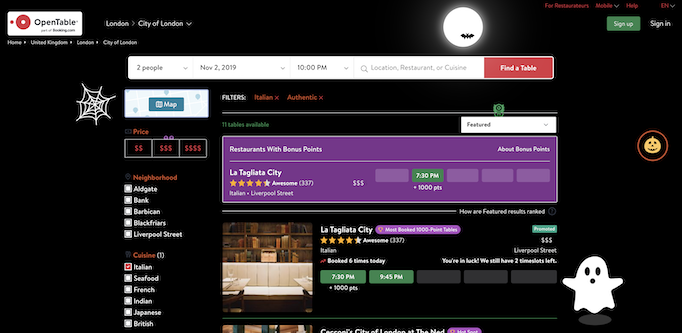
A few years ago, I thought it would be fun to create an 'Easter egg' style Halloween reskin for OpenTable search pages during Culture Time. If search page users clicked on a hovering pumpkin, then the screen transformed into the Halloween-themed page. This was largely a CSS task, which involved creating a spooky, new colour scheme. Next, I created various CSS animations such as an eerie moon, ghosts jumping out from behind search results, lightning flashes when the user hovered over a restaurant, and so on.
I created the reskin for fun at first, so I was delighted when my manager and the Product Team encouraged me to push the changes to production on Halloween!
It was awesome to see the re-skin go live for a day, and the Head of Product forwarded me Twitter messages from real OpenTable users who were enjoying the Halloween effects. I learned a lot from this project, notably about CSS animations, but also that OpenTable is keen to encourage bold and fun ideas.
ERG Library
Diana Tamas, Senior Software Engineer
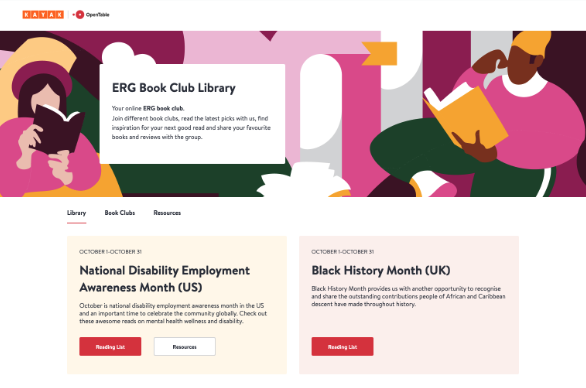
A while back, the Women ERG (Employee Resource Group) book club was getting traction, but spreadsheets for organising reading lists and recommendations were only getting us so far. So, we decided it would be nice to invest time in an internal website that everyone in the company could access to browse book recommendations, write reviews, and keep up-to-date with what the book club was currently reading. This also allowed us to highlight special events, such as Black History Month, by creating tailored book lists and showcasing them on the website. Eventually, more ERGs decided to get involved and create their own book clubs and book lists on the platform, even adding other media recommendations, such as podcasts or movies. It was a great collaboration between engineering, design and the various ERG leads.
Technically speaking, this was a fantastic opportunity for me to create an application from scratch using the OpenTable tech stack, while also getting more familiar with it. It involved more back-end work than the usual sprint work I undertake, as well. The frontend of the application was built using Next.js and the backend with Express.js. I also integrated the ERG Library with Okta, the identity and access management system we use, so that anyone from Kayak or OpenTable who was logged into our systems could access it.
LunchBot
Daniel Ireson, Software Engineer II
My favourite aspect of Culture Time is that you get the opportunity to work with people outside of your immediate team. Recently, I had the chance to work with John Catterfeld, a Senior Director of Engineering and Office Lead in London, on an online ordering system for office lunches. Previously, this was handled by our Office Manager, but it involved lots of manual steps. Each week they would have to send out the available meal options, follow up with reminders, place orders with restaurants, and just generally keep people informed. Typically there are around 50 meals being ordered each week, and because the system was very hands-on, it was easy to make mistakes. Not only was it stressful and time consuming to organise, there were numerous other problems with the process too, from people forgetting their order and taking the wrong meal, to people ordering but then not collecting their meal.
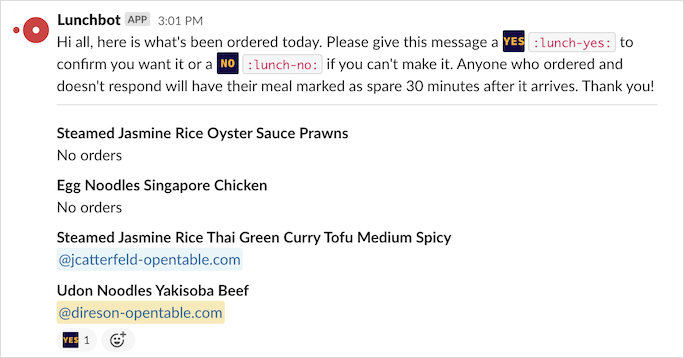
Naturally as engineers, we thought about what we could automate to prevent these problems. After a few weeks going back and forth with ideas, we arrived at a low-code solution leveraging Slack API, Slack Workflows, Google Sheets and Google Apps Scripts. We’ve introduced a Slack Bot called Lunchbot for order reminders and confirmations. At the heart of our solution is an order confirmation message automatically sent out on the morning of the office lunch that asks anyone who’s ordered food to confirm that they will be coming into the office that day. If people don’t react to this message with a specific emoji to confirm their order, we then let others know it is spare and can be taken. This message is great, because it reduces the likelihood of wrong orders being taken, reduces food waste, and just generally reduces channel spam on Slack. We have recently had our first real-world run through and it went overwhelmingly well!
ChatBot
Savithri Karabhattathiri, Software Engineer II
The ChatBot feature aimed to add support for chatbot messages on the direct messaging web page on OpenTable, to allow users to speak with a chatbot, instead of relying on restaurateurs to enquire about basic diner reservation details.
Last summer, after the Diner Messaging page in the diner-facing frontend application was shipped, the Communications Team analysed some data and noticed that restaurants only replied to 48% of the messages diners sent. So, more than half of the diner messages were going unanswered by restaurateurs. It was theorised that the main reason leading to this was that many restaurants were understaffed to be available to reply to every message they got from diners. To improve this, the Communications Team implemented chatbot support. The initial plan was only to support the chatbot for cancelling a reservation without restaurateurs' intervention, mainly because 10% percent of the diner conversation was about cancellations.
As part of this project, I added frontend support for the chatbot on the Diner Messaging page using Culture Time. As the name suggests, the Diner Messaging page is where diners with a reservation can speak with restaurateurs and, with this feature shipped, also with chatbots.
The backend implementation for this feature was executed by Carla Caldarola from the Communications Team in the London office. Working on this task involved collaborating with her, mainly during the initial phase to understand the requirements, as well as while testing the frontend implementation.
This project taught me how to collaborate effectively with colleagues from other teams, creating a reservation in the pre-production environment for testing, and integrating the diner-facing frontend with the backend to enable diner messaging. Additionally, I learned that we can configure restaurant data that drives the pre-production environment using an OTK4R/guest centre account. So, having OTK4R account can come in handy.
Locations Management Portal Interactive Map
Dafydd Giddins, Senior Software Engineer
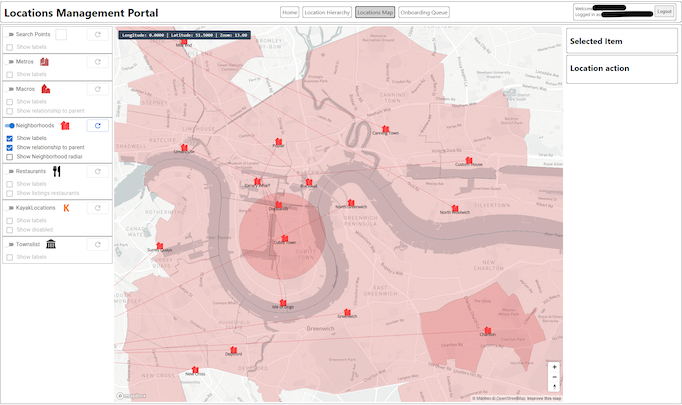
A while back, I built a tool to enable management of the OpenTable Location Hierarchy that was an ASP.NET Core hosting a React.js single-page application. This tool was an interactive hierarchy explorer that provided an interface for editing string translations and geographic data. We had an existing map view, which was built on ASP.NET MVC and Mapbox, but it had limited functionality and was not very user-friendly. So, I took it upon myself to build the foundations for an enhanced replacement using React.js and Redux-Toolkit. This included loading map content based on what was visible, rather than a set centre point, and allowing exact control over what elements were displayed on it.
This tool is now used internally for understanding the geographic relationships between different neighbourhoods. Future work will include adding functionality to edit locations matching a given set of boundaries, as well as modifying the hierarchy and creating new locations. I would also like to improve on the user interface.
Overall, working on this tool helped me become more comfortable with the Redux-ToolKit and Redux generally, as well as the MapBox API and the intricacies of integrating the two technologies together.